Free AI PDF to Text Converter Online

Easily convert any PDF into editable, searchable text with our free AI PDF to text converter. Unlock content for editing, copying, or reuse in seconds.

DeepPDF Svg
Upload a PDF or drag it here.
Max 200MB
pdf translator example[Example]
DeepPDF - A Deep Learning Approach to Analyzing PDFs
3/6/2025
pdf translator example[Example]
Collaborative Uses of GenAI Tools in Project-Based Learning
3/6/2025
pdf translator example[Example]
Evaluating Solutions to Marine Plastic Pollution
3/6/2025
pdf translator example[Example]
The Relevance of Financial Development, Natural Resources, Technological Innovation, and Human Development for Carbon and Ecological Footprints - Fresh Evidence of the Resource Curse Hypothesis in G-10 Countries
3/6/2025

AI PDF to Text Converter – Unlock Editable Text Free

Use our free AI pdf to text converter to unlock editable, searchable text from any PDF. Turn locked documents into clean text for editing, search, and reuse.

AI PDF to Text Converter – Unlock Editable Text Free

What is AI PDF to Text Converter?

AI PDF to Text Converter is a smart tool that opens up the content inside any PDF. It helps students, professionals, and creators extract and edit information easily, improving productivity and making research, report writing, and document management much faster.

What is AI PDF to Text Converter?

Why AI PDF to Text Converter is Recommended

AI PDF to Text Converter addresses the difficulties of extracting information from PDFs. By converting PDF to text quickly and accurately, it helps users avoid formatting mistakes, recover locked text, and easily work with the content for any purpose.

Why AI PDF to Text Converter is Recommended

Struggling with PDFs That Can’t Be Edited or Copied?

Locked, scanned, or image-based PDFs prevent users from editing, searching, or copying text. This slows productivity and wastes effort. AI PDF to Text Converter transforms PDF to editable and searchable text in seconds, solving these problems and making content ready for immediate use.

Struggling with PDFs That Can’t Be Edited or Copied?

How to Use AI PDF to Text Converter in 3 Simple Steps

Easily convert any PDF to editable text in minutes. This AI PDF to Text Converter extracts content accurately, helping you save time and streamline document handling.

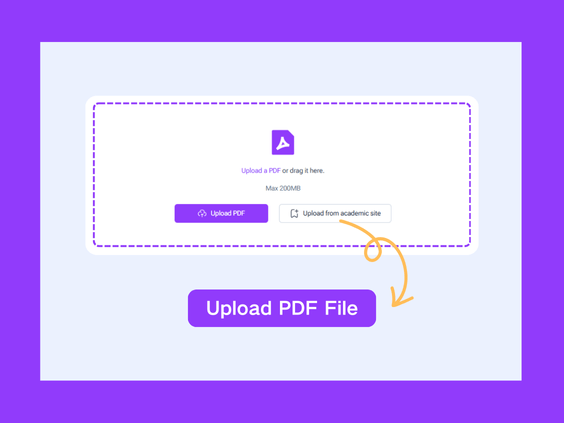
Step 1: Upload Your PDF

Step 1: Upload Your PDF

Select the PDF file from your device. The tool supports regular, scanned, and locked PDFs, allowing you to start the conversion instantly.

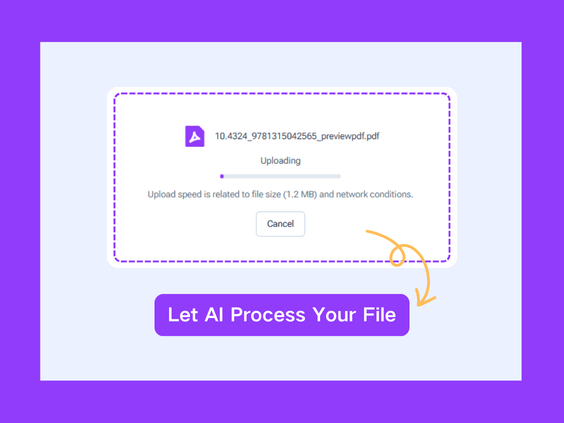
Step 2: Convert PDF to Text

Step 2: Convert PDF to Text

Let the AI PDF to Text Converter extract all text accurately. Within seconds, your PDF is transformed into editable and searchable text.

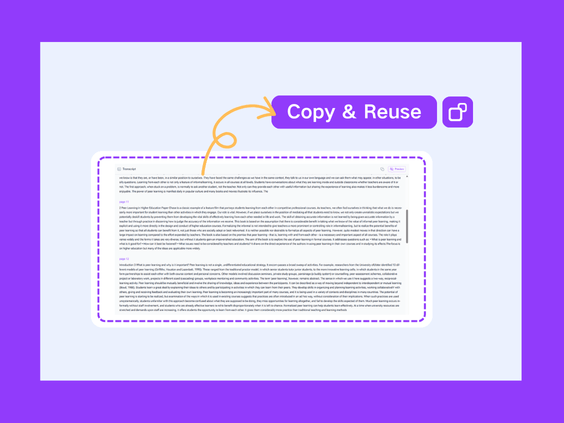
Step 3: Copy or Reuse Your Text

Step 3: Copy or Reuse Your Text

After conversion, you can copy or reuse the text in reports, notes, or any document instantly. This eliminates manual typing, speeds up your workflow, and lets you make full use of editable, searchable content from your PDFs.

What Makes AI PDF to Text Converter Stand Out

Convert PDF to text instantly with AI PDF to Text Converter. This free tool helps you unlock content from any PDF, making text easy to edit, search, and reuse without hassle.

Fast and Effortless Conversion

Convert PDFs to plain text in seconds with AI-powered processing. Even scanned or locked PDFs are handled instantly, providing editable content without extra software or complex steps.

Accurate and Complete Text Extraction

The tool extracts all text from PDFs precisely, ensuring nothing is lost. Users can quickly find and copy the content for any purpose, making information accessible and reliable.

Free, Online, and Simple

No installation or registration required. This free PDF to text converter works online, letting users access content instantly from any device, streamlining workflow with ease.

What Users Say About AI PDF to Text Converter

L.M. avatar

L.M.

Online Instructor

"Handling multiple research PDFs used to be frustrating because copying text was slow and error-prone. The AI PDF to Text Converter allows me to convert any PDF to editable text instantly, making my workflow efficient and stress-free. It’s a must-have tool for academics and professionals."

J.T. avatar

J.T.

E-commerce Founder

"I often work with locked PDFs for reports, and manually typing or copying text used to take hours. With this AI PDF to Text Converter, I can instantly convert any PDF to editable, searchable text. It’s fast, reliable, and saves me a lot of time. I highly recommend it to anyone handling documents daily."
S.K. avatar

S.K.

Marketing Specialist

"Managing client documents was always tedious because PDF text was often locked or scanned. Using AI PDF to Text Converter, I can instantly convert any PDF into searchable, editable text. It saves me hours every week and improves productivity across all my projects."
R.P. avatar

R.P.

University Student

"As a student, I need to extract text from scanned lecture PDFs for my notes. This AI PDF to Text Converter makes it incredibly easy. It converts PDFs to text quickly, and the output is accurate and fully searchable. It has completely replaced the manual typing I used to do."
A.D. avatar

A.D.

HR Manager

"I often receive scanned contracts that I need to review and edit. This AI PDF to Text Converter turns locked and scanned PDFs into editable, searchable text in seconds. It’s simple to use and saves me hours of work every week. I can’t imagine working without it now."
M.N. avatar

M.N.

Freelance Content Creator

"As a content creator, I constantly need text from PDFs for my projects. Previously, I spent so much time copying text manually. This AI PDF to Text Converter quickly converts any PDF to editable text, and the results are always accurate. It’s fast, reliable, and very easy to use."

Instantly Convert PDFs to Editable Text

No more copying or typing text by hand. Our AI PDF to Text Converter lets you convert any PDF into editable, searchable text instantly and effortlessly.

Start Converting Now

Frequently Asked Questions About AI PDF to Text Converter